 Nano Banana · 文字起步
限量周边发布的陈列架静物
白色陈列架把服饰周边与品牌核心商品组合,手绘背景提供杂志感,改写时选定一个周边品类和有限道具,统一产品色与背景的对比关系。
Nano Banana(数据集未披露具体版本)可从文字起步品牌与广告
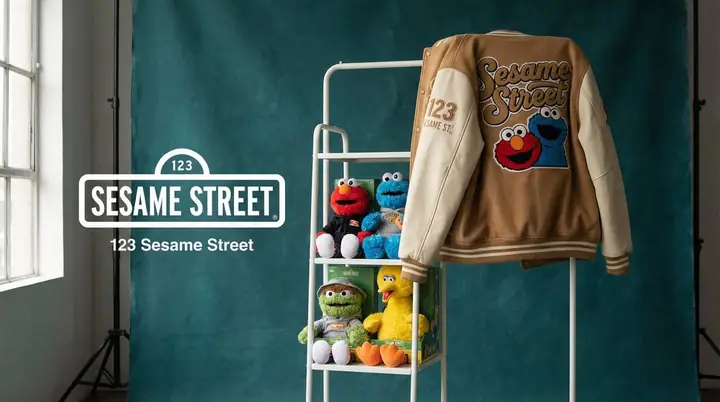
图片作者:@youraipulse。预览经过缩放与 WebP 转码;不是本站重新生成。
完整 Prompt
[BRAND NAME]. Act as a Creative Director and Still Life Photographer for a hypebeast fashion publication.
THE TASK:
Create a high-end "Showroom Still Life" photograph announcing a limited merchandise drop for [BRAND NAME].
PHASE 1: AUTONOMOUS CURATION (STRATEGY)
Analyze [BRAND NAME]: Identify the industry and the core physical product (e.g., if "Spalding" -> Basketballs; if "McDonald's" -> Burger Boxes; if "Visa" -> Metal Cards).
Determine the Palette:
Background Color: A deep, rich, textured tone derived from the brand's secondary palette (e.g., Teal, Navy, Burgundy, Slate Grey).
Merch Color: A contrasting warm or neutral tone (Camel, Orange, Cream) to pop against the background.
Select the "Merch Item": Choose a high-quality apparel piece relevant to the brand's vibe (e.g., a Varsity Letterman Jacket, a Heavyweight Hoodie, a Canvas Tote, or a Wool Scarf).
PHASE 2: SET DESIGN (THE RACK)
The Prop: A simple, modern White Powder-Coated Metal Rack or Shelf unit. It stands cleanly in the frame.
The Arrangement:
Hanging Item: The chosen "Merch Item" (e.g., the Jacket) is draped casually over the rack or hanging on a hanger, showing off the texture (wool/felt).
Stacked Items: On the shelves of the rack, stack multiple units of the brand's Core Product (e.g., a stack of basketballs, a pyramid of cans, a row of boxes).
The Background: A Hand-Painted Canvas Backdrop in the chosen Deep Background Color. Visible texture/brushstrokes are essential for that "studio" look.
PHASE 3: PHYSICAL BRANDING (TEXTURE)
On the Merch: The hanging apparel must feature High-Quality Physical Branding. Use "Chenille Patches", "Embroidered Logos", or "Screen Print" running down the sleeve or on the back. It must look like a real, expensive garment.
On the Products: Ensure the stacked core products have the correct [BRAND NAME] logo visible.
PHASE 4: PHOTOGRAPHY & LIGHTING
Lighting: Soft, directional window light from the side. Creates realistic, soft shadows on the rack and rich highlights on the textures.
Lens: 50mm or 85mm. Sharp focus on the merch, slight fall-off in the background.
PHASE 5: UI OVERLAY (THE "DROP" LAYOUT)
Left Side Alignment:
Large, clean White Logo of [BRAND NAME] floating in the negative space on the left.
Under the logo, small white text with the brand's official slogan.
怎样改成自己的版本
可从来源文字提示起步。涉及特定人物、Logo 或既有产品时,可以补充自己有权使用的参考素材。
把品牌名、Logo 参考、主色和文案一起替换。涉及现有商标的示例只代表视觉案例,不代表官方合作。
结构:品牌关键特征 → 核心隐喻 → 产品比例 → 画面层级 → 文案与留白
来源与署名
- Prompt 作者
- @youraipulse
- 案例出处
- 原帖 / 来源页面 ↗
- 收录合集
- NanoBanana Trending Prompts · MeiGen.ai
- 模型
- Nano Banana(数据集未披露具体版本)(来源标注,非当前版本声明)
- 作品日期
- 2026-01-26 · 数据集记录的原帖日期;互动数的原始抓取时间未披露
- 内容快照
- 2026-10-19
- 热度证据
- 475 历史点赞 / 37,561 历史浏览。数据集存档,原始抓取时点未披露,未独立核验实时数字。
- 内容许可
- CC BY 4.0(数据集声明;保留原作者署名)。保留作者与出处;源仓库例外条款及第三方权利仍适用。
本站未逐条重新生图;相同 Prompt 的效果会随工具、模型版本、参考图和多轮编辑变化。来源与方法